Origins
Selecting the "Origins" node displays the origins data panel.
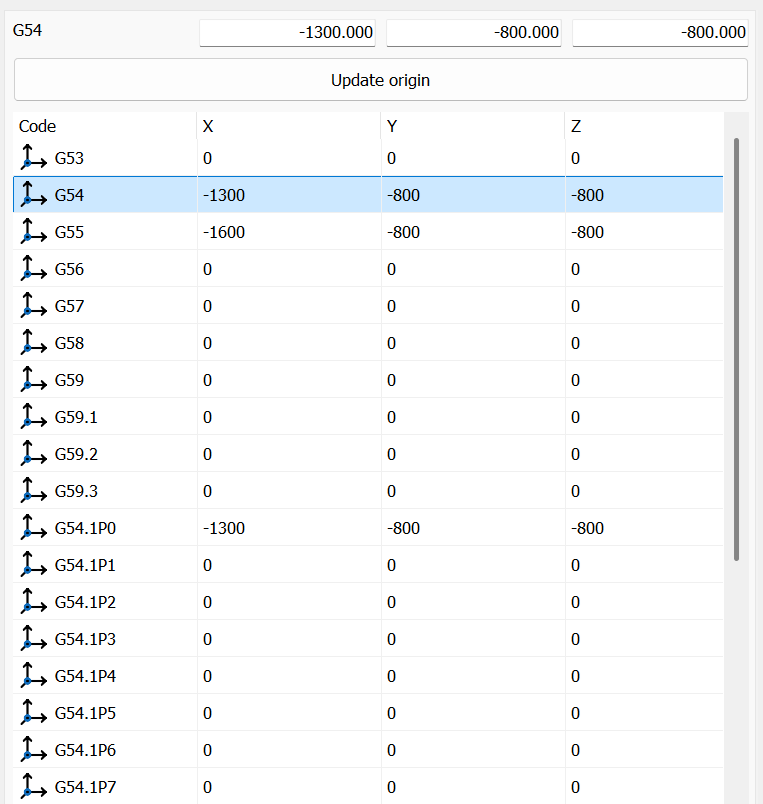
This panel contains the data of the selected origin:
- Code
The machine code of the origin (G54, G55...). - X, Y, Z
The position of the origin relative to the machine origin. While the values are edited, the 3D view shows the datum of the selected origin at the new position, before Update, also when the datums are hidden. - Update origin
Saves the entered position of the origin and regenerates all the NC files of the project, each once. The active file is regenerated last and keeps its unsaved changes in the editor. After the update the edited row stays selected.
Right-clicking the node opens the following menu:
 | Save origins as default Saves the current origins as default for the active machine. |
| Reset all origins position Resets the position of all the origins of the machine and regenerates all the NC files of the project. |
Whether the origins rotate and translate with the machine tables is set in Settings › Toolpath.