CNC
Selecting the "Project" node or the "CNC" node displays the machine control panel.
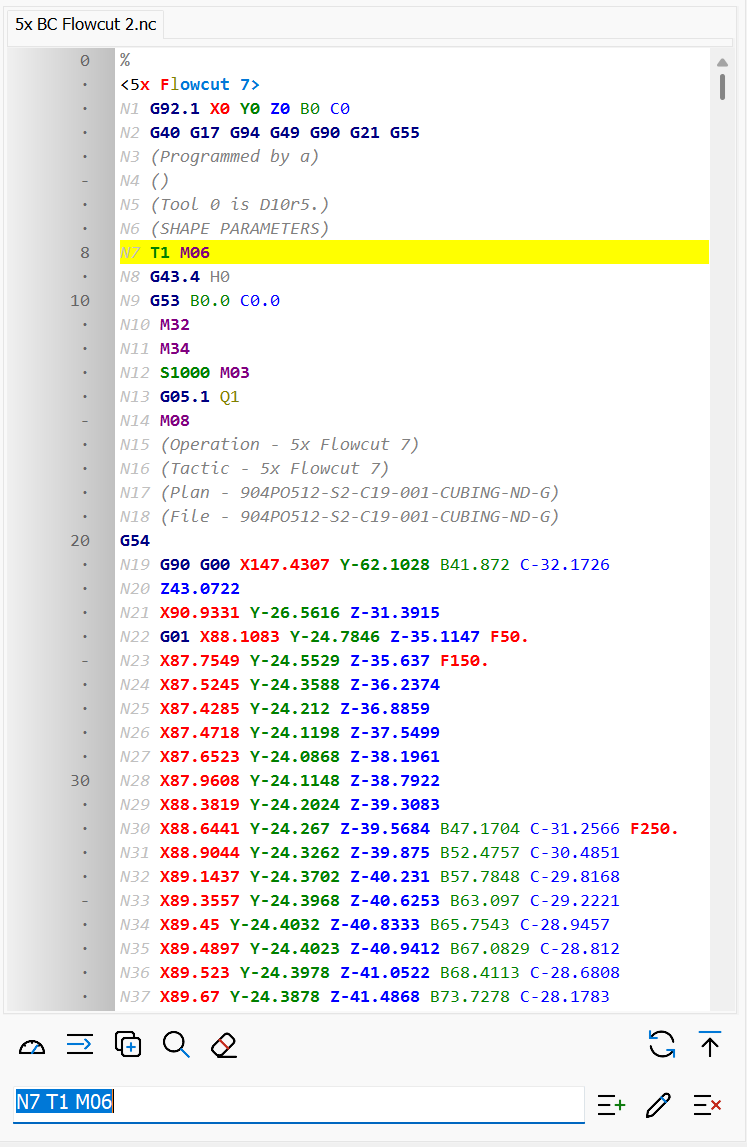
This panel contains:
- The editor, with one tab for each NC file and subprogram, showing the active NC file. The active line follows the simulation and is kept at half height of the editor; loops and subprogram calls show the current iteration in the gutter.
- The editor toolbar:

Open throttles
Toggles Auto/Manual mode, opening the manual control panel of the machine.
Go to line number...
Selects the specified line number in the editor.
Duplicate line
Duplicates the selected line, adding an identical one in the editor.
Search
Searches the specified text in the NC file.
Clear all
Deletes all the blocks of the NC file.
Regen
Regenerates the NC file after changes. Regeneration can also run automatically after editing a line, depending on the settings.
Go to top
Returns to the first line of the editor.Edit/Insert line
The field where the selected line can be edited or a new line written.
Insert line
Inserts the line of the field after the selected line of the editor.
Edit line
Replaces the selected line of the editor with the line of the field.
Delete line
Deletes the selected line from the editor. - The simulation toolbar: the same commands of the Simulation panel.
Direct edit
With Direct edit in editor on (Settings, or Direct edit in the context menu of the editor), the NC program is written and changed directly in the editor, like in a normal text editor (typing, selection, copy, cut, paste, undo). The Edit/Insert line field with the Insert, Edit and Delete buttons is hidden.
- The changes are applied when the cursor leaves the changed line (Enter, arrows, click on another line) or when the editor loses the focus. With Auto update on edit on, the NC file is regenerated and the machine moves to the current line; with it off, the lines changed and not yet updated are marked with a yellow bar in the gutter until Regen.
- With Show CNC hints on, the list of CNC codes appears under the line while typing: Up / Down scroll the list, Enter or a double click insert the code, Esc closes it.
- The first line of the program cannot be deleted, changed or moved. Subprograms shown in the editor are read-only.
- Up / Down move the machine to the new line; Duplicate line duplicates the line of the editor.
- The axis trackbars and the pick of axis coordinates still write into the Edit/Insert line field.
Mouse wheel in the editor
| Wheel | Scroll Scrolls the editor. |
| CTRL+Wheel | Zoom Enlarges or reduces the editor font. |
| ALT+Wheel | Step without checks Wheel down: next block without material removal, collision and overtravel checks. Wheel up: previous block. |
| ALT+C+Wheel | Step with checks Wheel down: next block with collision and overtravel checks, without material removal. Wheel up: previous block. |
| ALT+A+Wheel | Full step Wheel down: next block with all the checks and the material removal, like the down arrow key. Wheel up: previous block. |