Graphic User Interface
The SPC user interface is divided into four main areas:
The window title bar always displays:
- the current version of SPC;
- the name of the machine in use;
- the name of the numerical control in use;
- the name of the active NC file.
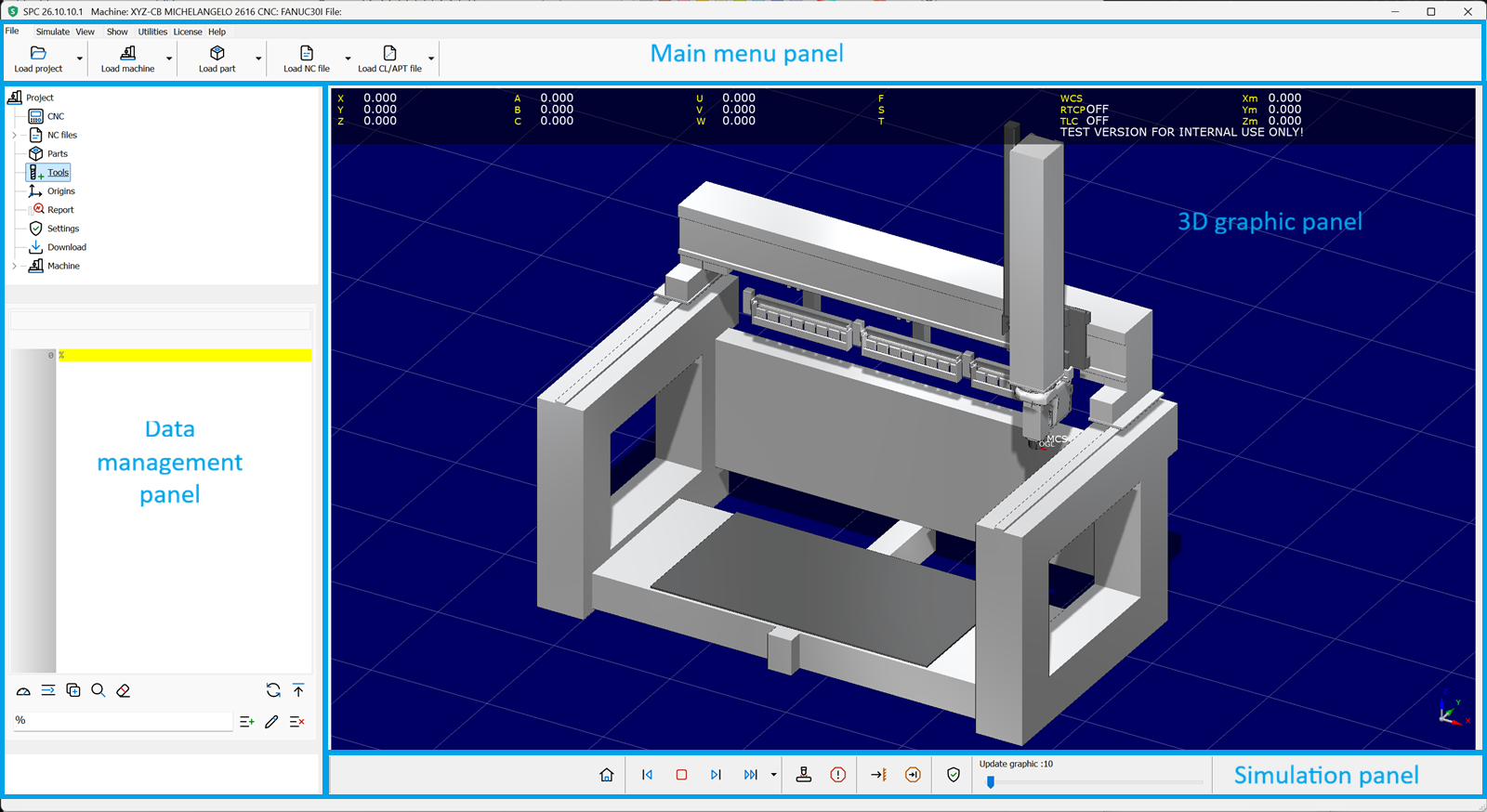
- The main menu panel is divided into tabs (File, Simulate, View, Show, Utilities, License, Help) and gives access to all the commands needed for the simulation and the management of SPC. A traditional main menu can be used instead, with the Use main menu option in Settings › Application.
- The data management panel contains the project tree and an area that shows the data of the node selected in the tree. The Machine wizard also opens in this panel.
- The 3D graphic panel always displays the machine and the whole work environment.
- The simulation panel contains the main commands to run the simulation of the toolpath.
The status bar shows the progress of long operations (loading of NC files, projects, parts and machines).
The icons of the commands follow the selected theme; their style (Line, Duotone, Semantic) can be chosen in Settings › Application. This help shows the Semantic style.